Archive for the ‘Project Management’ Category

A Different Way of Planning – Milestones

Tuesday, May 4th, 2010

Before you read this you’ll need a pen and a piece of paper…

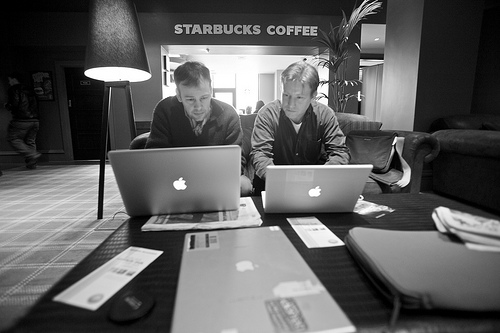
Benjamin and Jim Planning

Making Plans... Benjamin and Jim

OK. Draw a square. Now draw a triangle on top of the square. On the right hand side of the triangle, just on top, draw a rectangle. Now inside the first square you drew draw four other squares – but make sure they don’t touch each other, or the edges of the first square. In the bottom middle of the first square draw a rectangle, taller than it is wide. Pop a little circle half way up on the right hand side of the rectangle.

Done that?

What have you drawn?

Here’s the alternative, simpler and more effective way of doing it: Make me a picture of a house.

We’ve done this exercise countless times with people we’ve worked with over the years. Usually, out of a group of 10 people, maybe 2 or 3 will follow the first set of instructions and produce something that looks like a house. Most people follow the instructions to the letter, but don’t produce a picture that looks like anything recognisable. Clearly it’s not because they couldn’t draw a house… it’s because the instructions are ambiguous.

OK, so it’s a trivial example, but it has important implications for planning.

When you are building a plan you can choose to describe the journey in terms of ‘activities’ or ‘outcomes’.
Activity based plans are like the first set of house drawing instructions. You start at the beginning and work out the set of tasks that need to be done to achieve the end result. If you are really keen you might even draw out all of the activities on a Gantt chart, or issue people with a spreadsheet stuffed with tasks.

Outcome based plans are like the second statement. They start by describing the end result that you want to achieve and the key outcomes you expect along the way. The individual steps that you need to take to get there are left up to the person who is responsible for producing the output.

In our experience Outcome based plans win almost every time because…

  • Everyone knows what the target looks like. With the simple set of instructions above, our experience is that they only result in a recognisable picture of a house around 30% of the time. For the person who wrote the instructions it was obvious that it was going to be a house, because that was the picture they had in their mind, but when you have to work out the goal from the instructions its much harder. When you plan using activities and tasks its really easy to think you have completely described what needs to be done, but its really really hard to actually (I’d argue impossible) to build a completely infallible plan. By describing a set of Milestone outcomes that need to be achieved along the way, everyone can understand what the goal is and you don’t just rely on your ‘instructions’ being interpreted correctly.
  • The team can find creative solutions and different routes to the goal. When you plan using activities and tasks you map out a single route to the goal. There may be countless other ways to get there. People in your team will have their own experiences and ideas which will lead to better solutions. But, if you constrain people to a set of tasks you lose all of that. This especially important when things go wrong (and who has ever worked on a project where there wasn’t at least on slip up). If you define the outcomes, when things go wrong you give people the freedom to think on their feet and change the tasks they do to cope with the new situation. If you are in ‘task-world’ when things go wrong, everything has to stop while you define the new set of instructions.
  • You can measure progress by Outcome Milestones achieved, rather than by the amount of work done. If you tried to follow the first set of instructions above you would have no idea of how close you were to actually producing the intended result. You could have measured how far through the set of instructions you were, but that’s about it. Having done 100% of the work means nothing unless you have produced 100% of the intended outcome. By tracking against Milestones which are tied to outcomes you know that every time you complete one you have made tangible progress towards your goal.

In essence if you communicate what the goal is, the tasks will choose themselves. If you just tell people what tasks to do, you risk missing the goal completely. Its why we built Milestone Planner to be outcome focussed. Each Milestone in the plan is a tangible outcome. When you share your plan with your team everyone can see what needs to be done, when it needs to be done by and who is responsible for it. That’s what Milestone Planner is all about.

Building a 2010 Plan

Monday, January 4th, 2010

After reading “Create a 1-page strategic plan” on the Church of the Customer blog, I was inspired to try out an idea: Building a personal plan for the year in Milestone Planner. New Year’s resolutions have never really cut it for me – a few weeks and they are a distant memory. I prefer to start out the year with a set of goals. However, the plan never seems to “fall out of the sky” fully formed, so Milestone Planner’s emergent style seemed to fit the bill. Here’s how you can build your own personal strategic plan for 2010:

1. Create a plan!

Plans are a great statement of intent. They provide something to benchmark progress against. No plan, no benchmark. So, sign up at milestoneplanner.com if you haven’t already (A trial account is free, and will last you through the year). You’ll have a blank project plan waiting when you sign in. If you are already signed up, just login and go to projects, then click the button to create a new plan.

2. Map Out Your Roles and Responsibilities.

To make some sense of your goals I suggest dividing them up. There are a number of ways to do this:

  • By role – e.g. Father, Musician, Husband, etc…
  • By area or domain – e.g. Family, Job, Community, …
  • By theme – e.g. Health, Wealth, Social, …

Simply create a workstream for each role or area – you’ll be prompted for the first one, or click “add a workstream”. After you’re done, you’ll have some horizontal groupings with spaces ready to add your goals for the year. If you aren’t sure which approach to take, try a couple and see which one works best. It is easy to delete workstreams – just click on their title.

3. It’s a Whole Year!

Think marathon, not sprint. You don’t need to achieve everything in January, but you also don’t want to leave everything until December. At the top left of the screen, by the project name, click edit and change the project start date to 01/2010, change the end date to 01/2011 – you might want to give it a sensible name at the same time. There, the plan is now a year long. Thats a good few hundred days to spread things out over, but first…

4. Begin With the End in Mind.

To borrow a Covey phrase, begin with the end in mind. Scroll right to the end of the plan. Think about the end of December 2010. What would you like to have achieved in each of the areas you’ve defined? Click on the time line and create a goal, or two if you need to, in each workstream. Capture your thoughts and go for big, but specific goals. More than seven workstreams with more than one or two goals in each is probably biting off too much, but you know yourself. Choose what you think will work. Remember, you can always update the milestones and add or remove workstreams later – this is an emergent strategic plan.

5. Work Backwards – Little by Little.

Now, zoom out and look at the year. Thinking about those end goals, what the smaller milestones on the way towards them that you can achieve throughout the course of the year? If I wanted to play live in a band at a local music venue by the end of the year, I can think backwards: “Rehearse a full set” – I’ll put that in at the end of October. “Choose and learn 12 songs” – I’ll put that in at the end of July. And so on. I might start with “Guitarist Recruited” in February. You hopefully get the idea.

Take those big end-of-year goals (you might want to change them to yellow or red to mark them out – just click on them) and break them down into smaller goals. Look up and down the plan at the milestones in each of the different streams – are there any opportunities for synergies? If I had a goal around more time with the family, I might want to have them in the band. Of course the rule for truly realising synergies is to avoid compromises, so you might want to leave that one.. In all seriousness, it is interesting how a personal plan starts to mesh together when you look at it this way. Sometimes the opposite happens too – you spot areas of your life that really aren’t fitting in. This might be a time to tweak some ‘big’ things.

6. Sleep on it…

With your first cut of the plan done, take one last look at it, then log out. Let the sun go down and them come up again. Let your brain digest all of those thoughts you’ve just had. Now, login and look at the plan. Does it still make sense? Can some of the milestones be better defined, or rearranged? Drag things around until it is right.

7. Share Your Plan.

This might not be for everyone, but if you have a trusted friend or partner, you might want to share the plan with them (it’s simple to add them – just click on ‘people’ and enter their name and email address). Having someone else look at your plan can help in a number of ways:

  • An independent set of eyes see what you might miss. It is good to be challenged.
  • Sharing your plan creates a sense of accountability and motivation to achieve it.
  • A shared load… Having someone who will cheer you on is good when things get tough.

Of course, you might feel your plan is too personal to share, and that’s fine. I’d ask yourself why you aren’t comfortable sharing it – the answer to that question is surprisingly full of useful insight.

8. Live the Plan!

Now live the plan! Email yourself a copy and print it out and put it somewhere you’ll see it. Come back and login to the plan – I’d say once a week. Look at the upcoming milestones and watch the red “today” line mark your way through the year . Mark each milestone done as you achieve it, and update goals and milestones if things have evolved during the year.

2010 – Have a good one!

Hubs to Meshes – Person to Person Project Management

Tuesday, November 17th, 2009

One of the problems Milestone Planner sets out to address is the traditional bottleneck that happens in project management: Someone ‘owns’ the plan, and every-time there is an update, that person has to be contacted, update the plan and push a new version out. Or, as is more often the case, the owner of the plan is left chasing people for updates. The result is people living with a permanently out of date plan, and chasing each over via phone and email. That’s no way to run a business. Time for one of Jim’s cartoons…

hub

The hub model has the appearance of a safe, controlled, well-managed process. The reality is that it leads to people making decisions on in-accurate information, and at the speed of one bottle neck. Of course, there is a different way to do things.

mesh

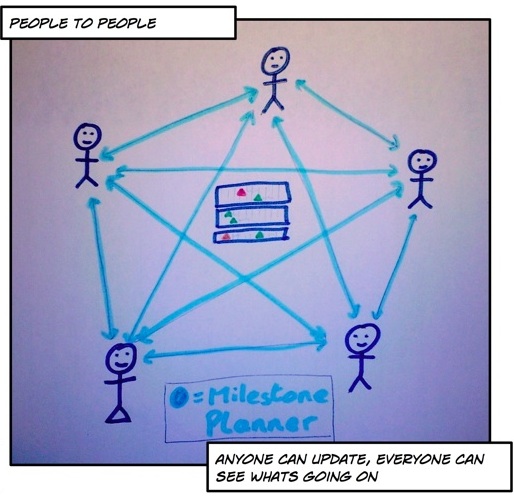
The mesh model is peer-to-peer. Anyone can interact directly with anyone else. In the case of Milestone Planner, this means that anyone in the project team can go and update their milestone directly, and see the most up to date version of the plan. No trawling through emails or folders trying to find the latest-latest version.

It is a person-to-person form of management and communication (something that Scott Gould of Likeminds is blogging a fair bit about – Becoming P2P), and based on an “adult-adult” communication model, rather than the less productive “adult-child” one that so often accompanies the hub/star model. We’re aiming to make Milestone planner a grown up tool, for grown up people.

Let us know what you think.